Someone Built a Bitbucket CLI. It Changed Their Mind About MCP.
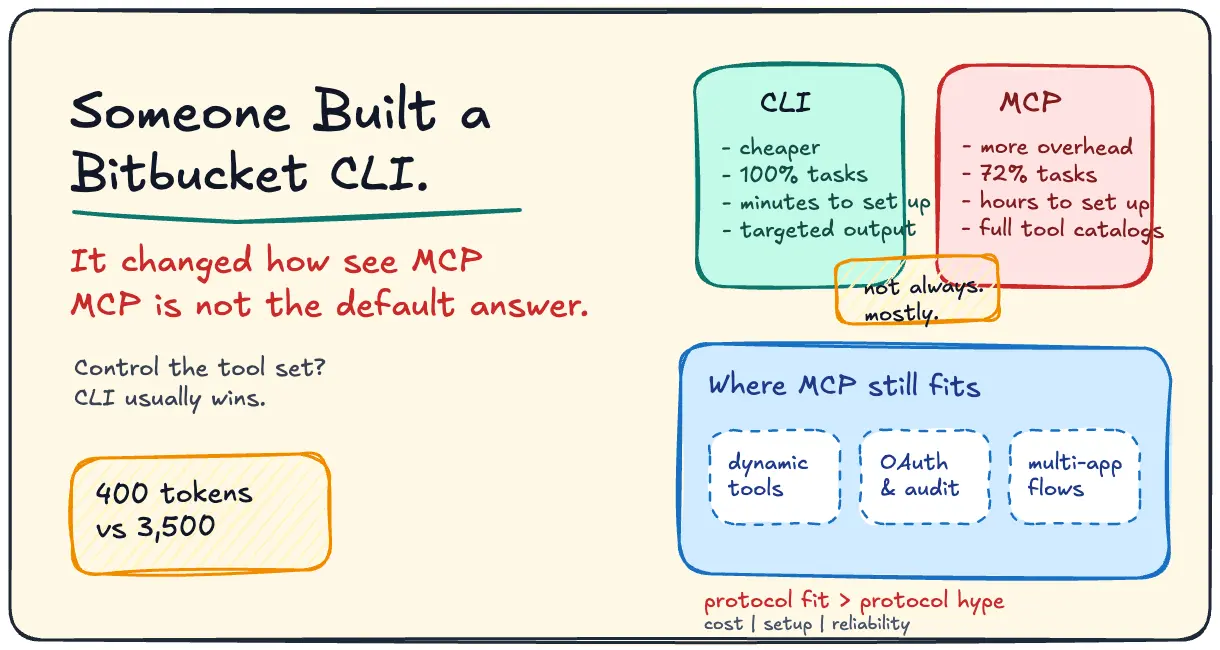
Benchmarks keep landing on the same verdict: for most developer agent tasks, CLIs beat MCP servers on tokens, cost, and reliability. MCP still wins in narrower cases than the marketing suggests.
MCP was supposed to be the universal connector between AI agents and the real world. Clean protocol, structured tool discovery, standardized auth. The pitch made sense.
Then people actually built with it and ran the numbers.
Hugo Baret built a Bitbucket CLI and came out the other side convinced CLIs beat MCP servers for AI agents. He’s not alone. The benchmarks across multiple independent tests say the same thing.
The Numbers
Token efficiency is where MCP falls apart for most development tasks.
| Dimension | CLI | MCP |
|---|---|---|
| Simple repo query (GitHub MCP, 43 tools) | ~1,365 tokens | ~44,000 tokens |
| Single server schema overhead (Slack, 12 tools) | 0 | ~3,500 tokens |
| Tool invocation cost | ~30 tokens | schema loaded every session |
| 5-server setup baseline cost | 0 | ~55,000 tokens before first query |
| Task Efficiency Score | 202.1 | 152.3 |
A 32x token gap on a simple repo query is not a rounding error. And that’s before you count the 55,000-token baseline MCP burns on a 5-server setup before the first actual query. It’s the protocol overhead from MCP’s structured tool discovery: the model loads the server’s full capability catalog into context every session. You pay for that in tokens every time.
Jannik Reinhard’s Token Efficiency Score testing put CLI at 202 vs MCP at 152, a 33% efficiency advantage. More importantly, CLI completed tasks MCP couldn’t handle structurally, because full shell access means targeted output rather than dumping entire data structures.
Where MCP Still Makes Sense
The case for MCP is not dead. It’s just narrower than the marketing suggests.
MCP has real advantages where CLI falls short:
- Dynamic tool discovery for non-technical users who can’t define the tool set upfront
- Structured OAuth 2.1 auth for multi-user, enterprise environments where per-user permissions matter
- Native audit logging when you need a compliance trail for every tool call
- Multi-app integration across services that don’t share a shell environment
The QIS memory layer argument is the cleanest version of the “you need both” case: MCP handles tool access, a separate memory layer handles agent state across sessions. Neither solves what the other solves. Stack them.
The Decision Framework
Before you default to MCP, answer two questions:
1. Does your agent need dynamic tool discovery, or do you control the tool set? If you control it, CLI. If users or external services define it dynamically, MCP.
2. Do you need per-user OAuth and audit logs, or are you building for yourself or a technical team? If it’s the latter, CLI is faster, cheaper, and more reliable.
Most developer tooling falls into the “you control the tool set, you’re building for technical users” bucket. That’s CLI territory. The Bitbucket case is a clean example: Hugo knew exactly what Bitbucket operations the agent needed. A CLI handles that with a ~30-token invocation against a definition the agent already knows. An MCP server handles it by loading the full schema every session before the first call lands.
MCP is not the default answer. It’s the right answer for a specific set of conditions. Know which set you’re in before you build.
Sources: Hugo Baret’s Bitbucket CLI · Noqta MCP vs CLI benchmarks · Jannik Reinhard TES analysis · QIS memory + MCP · OpenClaw MCP vs CLI framework
Written by Nirav Joshi · Full-stack & AI Developer
Newsletter
Want the next post like this?
Subscribe for occasional emails when I publish something worth your time.